
CYANOTYPE
BLUEPRINT DESKTOP
The desk tools stay small on purpose. A clock, a notepad, a mixer, a filer. A capital application is the other kind of program, one large job that a person sitting down at a current machine already expects to have. Every Cyanotype release through 5.0 ships two of them. The names change when the next ones are actually ready, and the count stays at two. Right now those two are CyThrough and Sunbeam.
CyThrough publishes X11 programs, one at a time, and puts each program's windows on this desk. You might be sitting at an IRIX box, a BSD box, or a Linux box, while a faster machine runs a browser, an OpenGL program, or an ordinary Motif tool for you. You double-click the icon. The windows land here, framed by this window manager, next to the programs that actually live on this machine. There is no nested desktop, and there is no picture of the other machine's whole screen. The path is ordinary X11. This is not a new display server, and it is not a Wayland portal. Linux, BSD, and IRIX can each be the server or the client. The license is BSD, and the code is C99.
Once you are logged in, the face is an icon catalog, in the same shape as the filer. A click selects a tile. A double-click, or Return, opens it. A scrollbar shows up when the list is taller than the window. The first tab is Running. Those are the programs already up on that server, kept the way a terminal multiplexer keeps a session. A second double-click resumes the same program, and it does not start a fresh copy. The other tabs are categories. You pick the category when you publish the program, and the catalog grows a tab for it. The picture below is a live server with sixteen programs, and tabs for Running, All, Simple, Tools, Web, and OpenGL. Chrome and Firefox brought their own icons, and so did Gimp, the editors, and the X tools. The gears and the other OpenGL demos are published the same way.
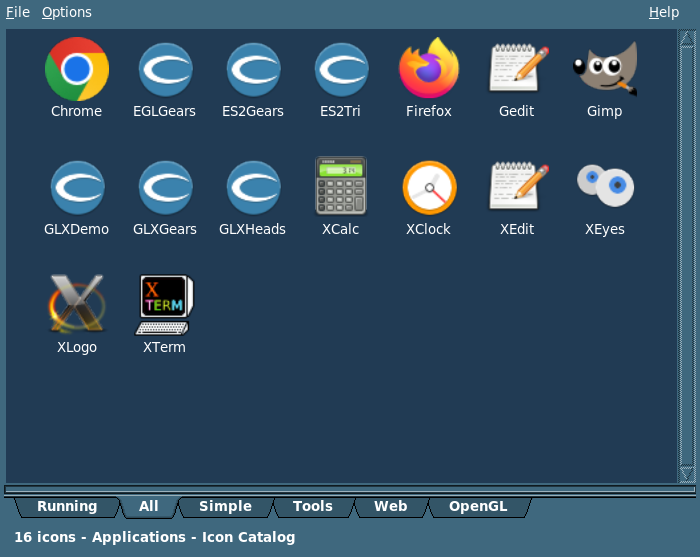
The icon catalog, after login. This server published sixteen programs. Running is what is already up. All, Simple, Tools, Web, and OpenGL are the categories you assigned when you published them. A double-click starts a program, and a double-click on Running resumes the one that is already there.
One icon is one program. On the usual path the server gives that program its own private X server, so a click does not drag in every window that happens to be open on a shared display. What shows up here are the program's real top-level windows. The title is the title the program set. Move, resize, and minimize belong to the window manager on this desk, not to a picture of the other machine's frame. Menus, tooltips, and the other popups that X marks override-redirect (windows that are not supposed to get a frame) come across without a second frame and without a taskbar button. Closing the viewer does not kill the program. It stays on the Running tab, and you double-click it again when you want it back. Right-click a Running tile and choose Kill this app to stop that one program. The Options menu has Stop all apps, which stops every program you have up on that server.
Right-click any tile and choose Materialize On Desktop if you want a launcher on the desktop. The next time you use that launcher, it starts the program directly. The cythrough command does the same job from a script or a menu, and it does not open Preferences to do it. Preferences is the catalog and the settings. The viewer has no window of its own. The windows belong to the remote program. That is where the work happens.
Publishing is an allowlist, and you edit it on the server. Each entry has a name, a category, the program to run, and an icon. You can add one, remove one, or import a desktop file. The list saves when you edit it. Restart CyThroughD, and the catalog the clients see is that list. An empty list publishes nothing. CyThroughD is personal. It uses your X display, and it is not setuid, so it does not run as root. Quitting Preferences does not stop the daemon. The session starts it at login only if you asked it to. The Server tab is start, stop, and restart, plus the port, the display, and a choice about whether this seat's real X server is the one being published. You want that hardware display when the program is OpenGL on the machine's own screen. You want the private display when each icon should be its own session.
The Client tab is the login, and it remembers more than one server. You fill in the host, the port (4900 unless you change it), an optional knock phrase, the account, and the password. The password is the ordinary login password on that machine. There is no separate CyThrough account, and you can save the password for that server if you want to. Encryption is compiled in, and it stays on unless you clear the checkbox. A knock, when you set one, is a short phrase the client sends before the session starts, so a scanner that does not know the phrase never sees the login. Leave the phrase empty and the client tries the port as it stands. With encryption off there is no knock, the session is not encrypted, and the window title says so. The account still has to accept the password. Refresh Catalog stays gray until the login has succeeded. The File menu is Connect, Refresh Catalog, and Exit.
The server sends the rectangles that changed, which is what "damaged tiles" means here, rather than a fresh copy of the whole screen. The server does the encoding. This desk decodes the tiles and paints them. A scroll can be a copy of pixels you already have, and repeated text can be sent as glyphs, so a terminal does not pay for a new picture of the same characters. OpenGL stays on the machine that owns the program. The daemon arranges for that program to hand back a photograph of the window after it swaps buffers. The viewer never speaks OpenGL. Copy and paste of text runs both ways, up to 256 KB. Sound for the session is not in this release. CyThrough starts the program you published. It does not reach over and adopt a window that was already open on that screen.
The same catalog is on the CyThrough page. The login face, on its own, is on the Preferences page.
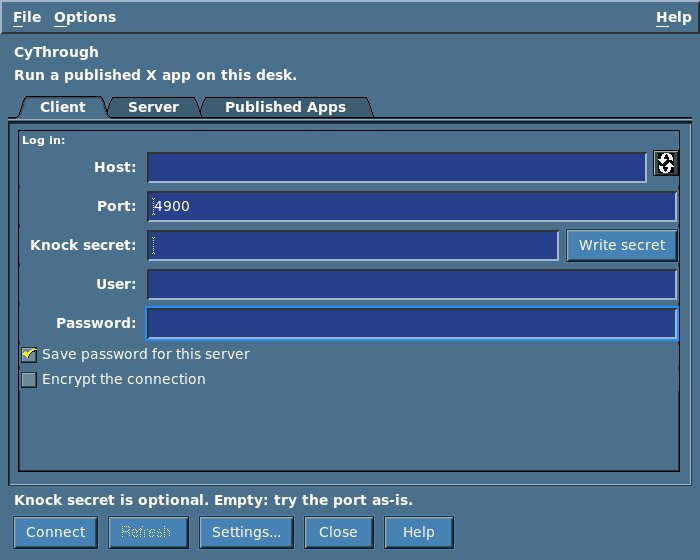
The Client tab. You set the host, the port, an optional knock phrase, and the account. Encryption is a checkbox, and you can turn it off. The password is that machine's login password.
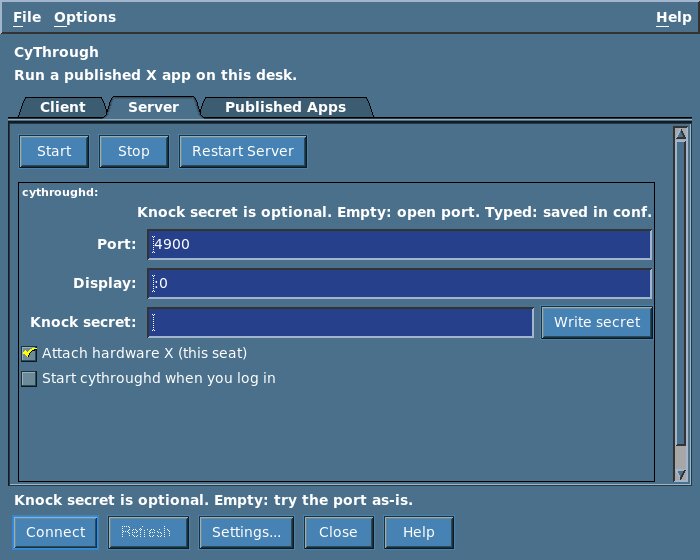
The Server tab. Start, stop, and restart CyThroughD from here. You also set the port, the display, and whether this seat's own X server is the one being published. Login-time start is its own checkbox, and it stays off until you ask for it.
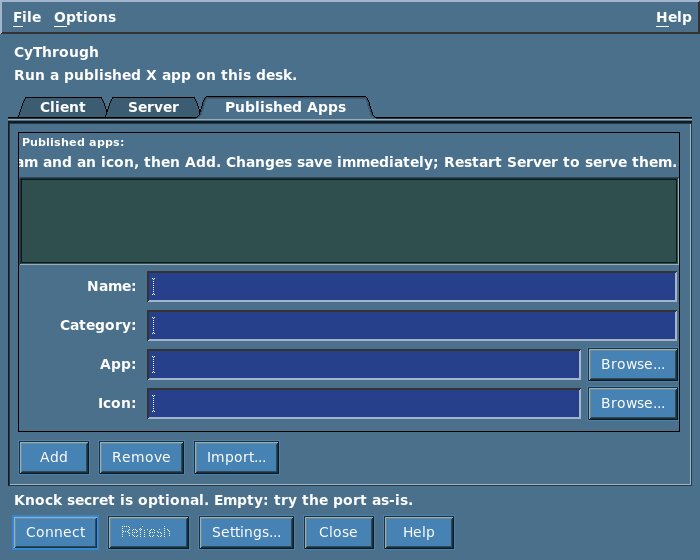
Published Apps, which is the list you edit. Each row is a name, a category, the program, and an icon. You can add a row, remove one, or import a desktop file. The list in this picture is empty. The catalog above is what a client sees once a server has a list and CyThroughD has been restarted.
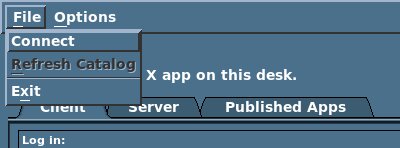
The File menu: Connect, Refresh Catalog, and Exit. Refresh Catalog stays gray until the login has succeeded.
Sunbeam is a calendar, written in C99, on the same libcyui the desk uses. It speaks CalDAV, so the events live on a server you already have, rather than in a private file format. It is the old Mozilla Sunbird calendar, brought back as a real program. It also runs on a Motif machine that is not running Cyanotype. Under the desk it follows the live color scheme. On its own it uses Icy Blue Mountains, the same default CyStar uses. The grid, the throbber, the clock, and the notifiers are still drawn with Xlib. The rest of the window is libcyui.
You look at the same calendar as a month, a week, a day, a year, or a list. A timed event occupies the hours it actually covers. When two of them overlap, they sit side by side in lanes. The day view draws a line at the current time. All-day events stay in a band of their own. You can keep more than one calendar on one account, and you can keep more than one account. Nextcloud, Radicale, Fastmail, CommuniGate, and DAViCal are the servers it speaks to.
A new event has a summary, a place, categories, a priority, and a description. You mark it busy, free, tentative, out of office, or private. Attendees are people. A room or a piece of equipment is a resource, which is how the server tells a human from a thing, rather than a name you typed into a note. Find Free Time and the directory lookup sit on that same dialog. Invitations go out as iMIP, which is a calendar invitation your mailer can send as an attachment. Free and busy works in both directions. You can publish yours, and you can watch someone else's. Tasks live in the account as VTODO entries, which are the to-do items in the same calendar format. You can make a calendar on the server, rename it, and remove it. Copy, cut, and paste of an event work across servers. Backup and restore are ordinary .ics files. An attachment opens with whatever handler the desk already has for that type of file.
sunbeam-remind sits in CyChest, or in any freedesktop tray, as an XEmbed client. XEmbed is the protocol a tray icon uses so it can live inside another program's window. With no tray manager it falls back to a dockapp, which is a small window parked in a dock. sunbeam-cli is the same calendar with no window, for scripts and for anything that should not link the GUI. The tree builds on Linux, AIX, IRIX, Solaris 8, NetBSD, FreeBSD, and OpenBSD. Sunbeam's page is the longer writeup of this same program, with these same four pictures.
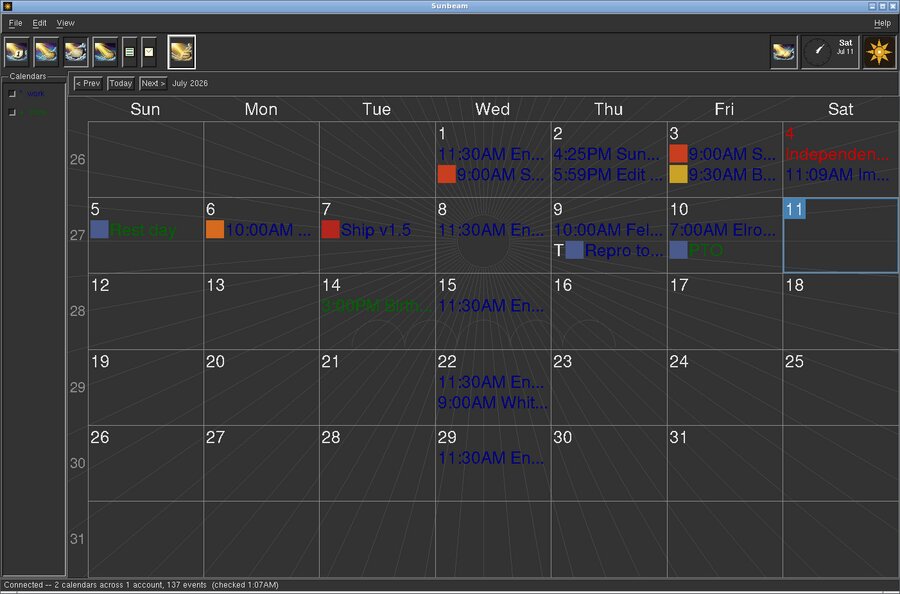
The month view. Each color is one calendar. The day you are on is the outlined box, and the status line shows two calendars on one account.
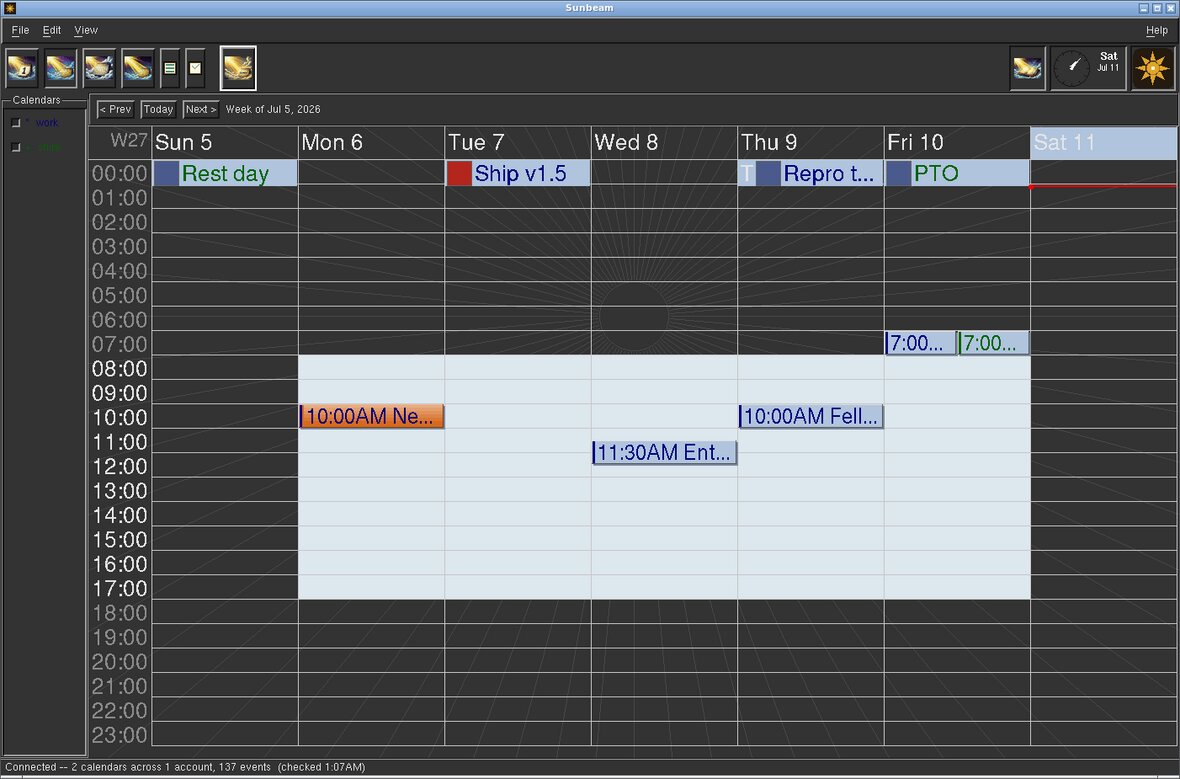
The week view. Timed events take the hours they actually cover. All-day events stay in the band across the top, and the line on Saturday is the current time.
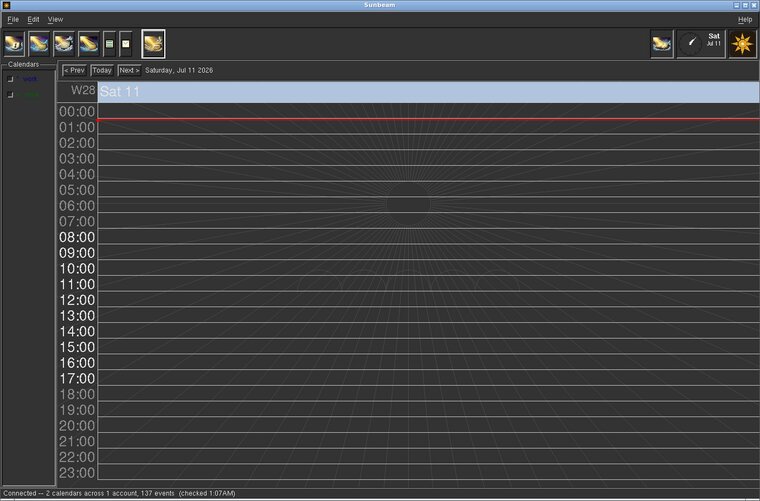
The day view. The hours run down the side, and the line across them is the current time.
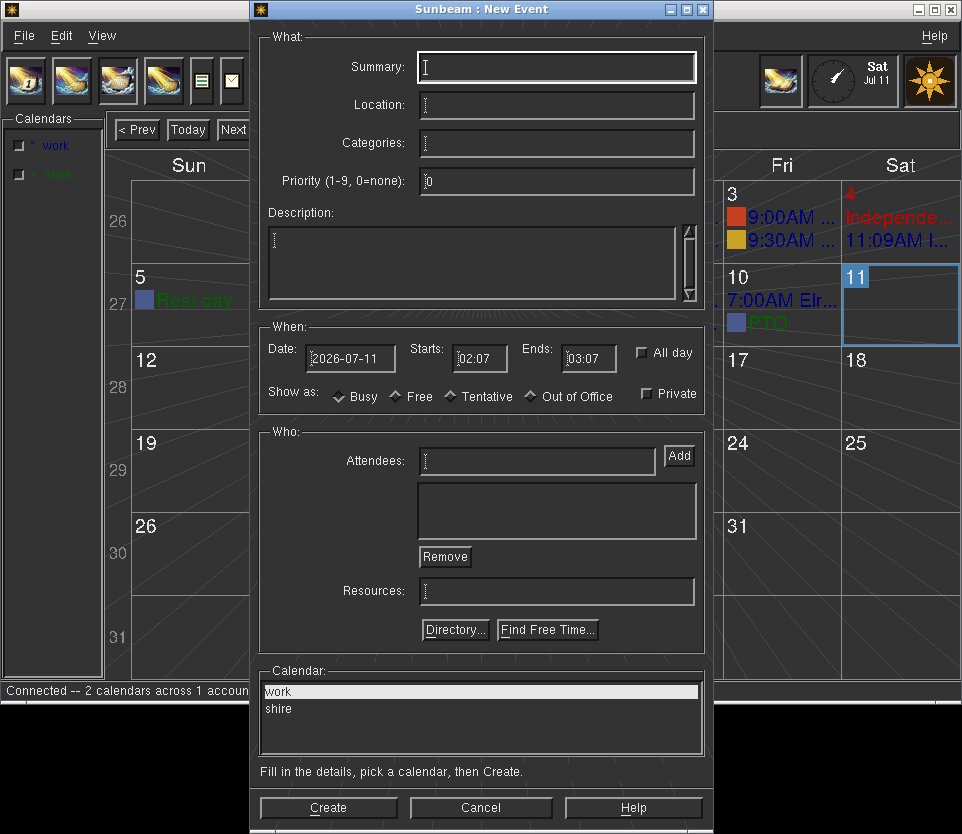
A new event. You can add attendees, a resource, a directory lookup, and Find Free Time. Show-as is busy, free, tentative, out of office, or private.
Two capital applications per release, through 5.0. Three later jobs are already decided in kind. They do not get a version number until they exist.
CyPerson is the InPerson replacement. SGI's InPerson was the face-to-face program: voice, video that travels with the voice, and a way to share what is on the screen. CyPerson is that job. It finds the other end on the local network, and the two ends exchange cards. The codecs stay in the set we can ship, BSD or close to it, and the picture may borrow CyThrough's tile compression. It is not a text chat with a camera attached. There is a probe in the tree. There is no product in 1.0.
The instant messenger is a separate program. The first version stays on the same network, with no server in the middle. A phone comes later, either as its own client or as a bridge that can hand a message to SMS. It stays separate from CyPerson, because talking and typing are different jobs.
There will also be some games that live on the desk, in the environment. Not in a store, and not in a browser. No titles yet.
Galaxy is the name of the list, not the galaxy color scheme on the screen saver. It is the work that is written down and kept out of the current release on purpose. Nothing in this section ships on 31 October. 1.0 is the desk, plus CyThrough and Sunbeam.
A few of the items on that list:
The desk tools stay the desk tools. The capital applications are the two large ones. When a Galaxy item grows up into one of those, it takes a slot in some release through 5.0, and something else waits.
 Cyanotype Project. Blueprint Desktop. BSD 2-clause.
Not affiliated with Silicon Graphics. SGI, IRIX, and Indigo Magic
belong to their owners. 1.0 is aimed at 31 October 2026.
Cyanotype Project. Blueprint Desktop. BSD 2-clause.
Not affiliated with Silicon Graphics. SGI, IRIX, and Indigo Magic
belong to their owners. 1.0 is aimed at 31 October 2026.