
CYANOTYPE
BLUEPRINT DESKTOP
Window manager
CyWM is the window manager. Together with the toolchest and the file manager, it is one of the three programs that make up the desktop. The frames follow Indigo Magic. The behavior we treat as canonical is 4Dwm: the window menu, the Alt+F accelerators, cascade placement, and a choice between an opaque move and a technical (outline) move and resize. It speaks ICCCM, the older contract between a client and its window manager, and EWMH, the newer hints a pager and a desktop use for virtual desks and fullscreen. Ten virtual desktops, an on-screen banner, and a policy for frameless override-redirect windows all live on that same surface. Preferences stay in ~/.cyanotype/cywm.conf. CyWM Preferences writes that file, and a running CyWM reads it again, so you do not log out to change a focus policy.
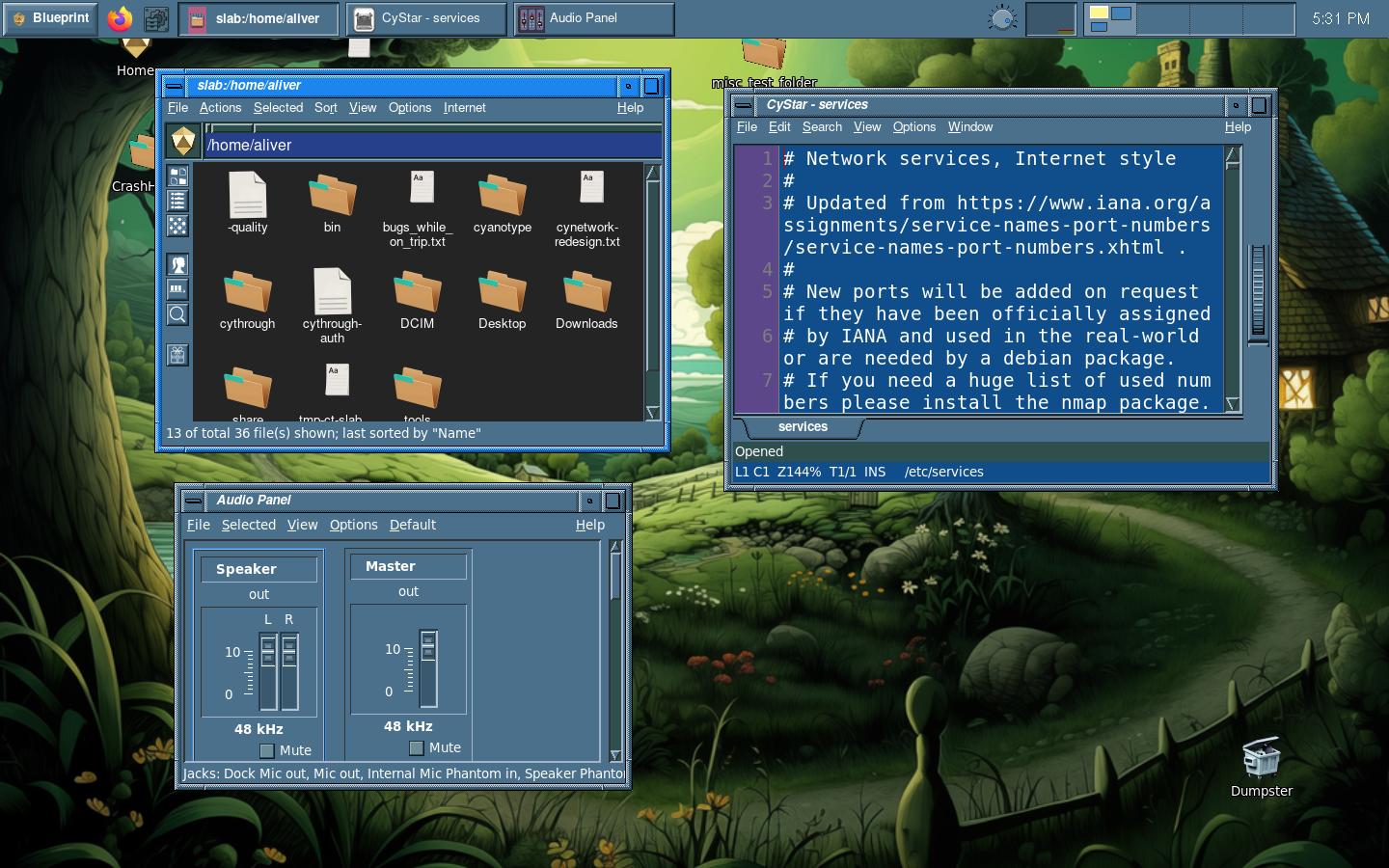
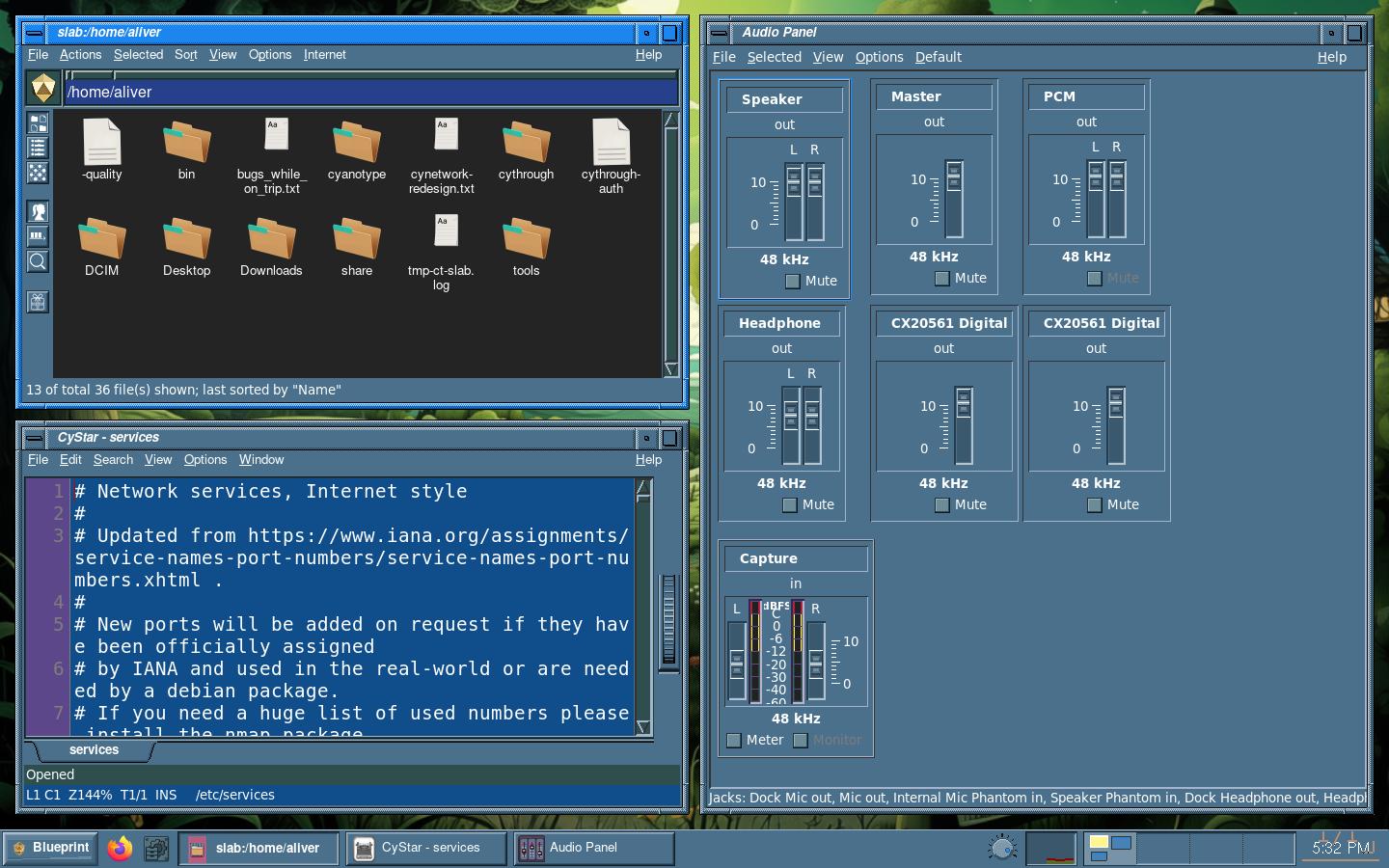
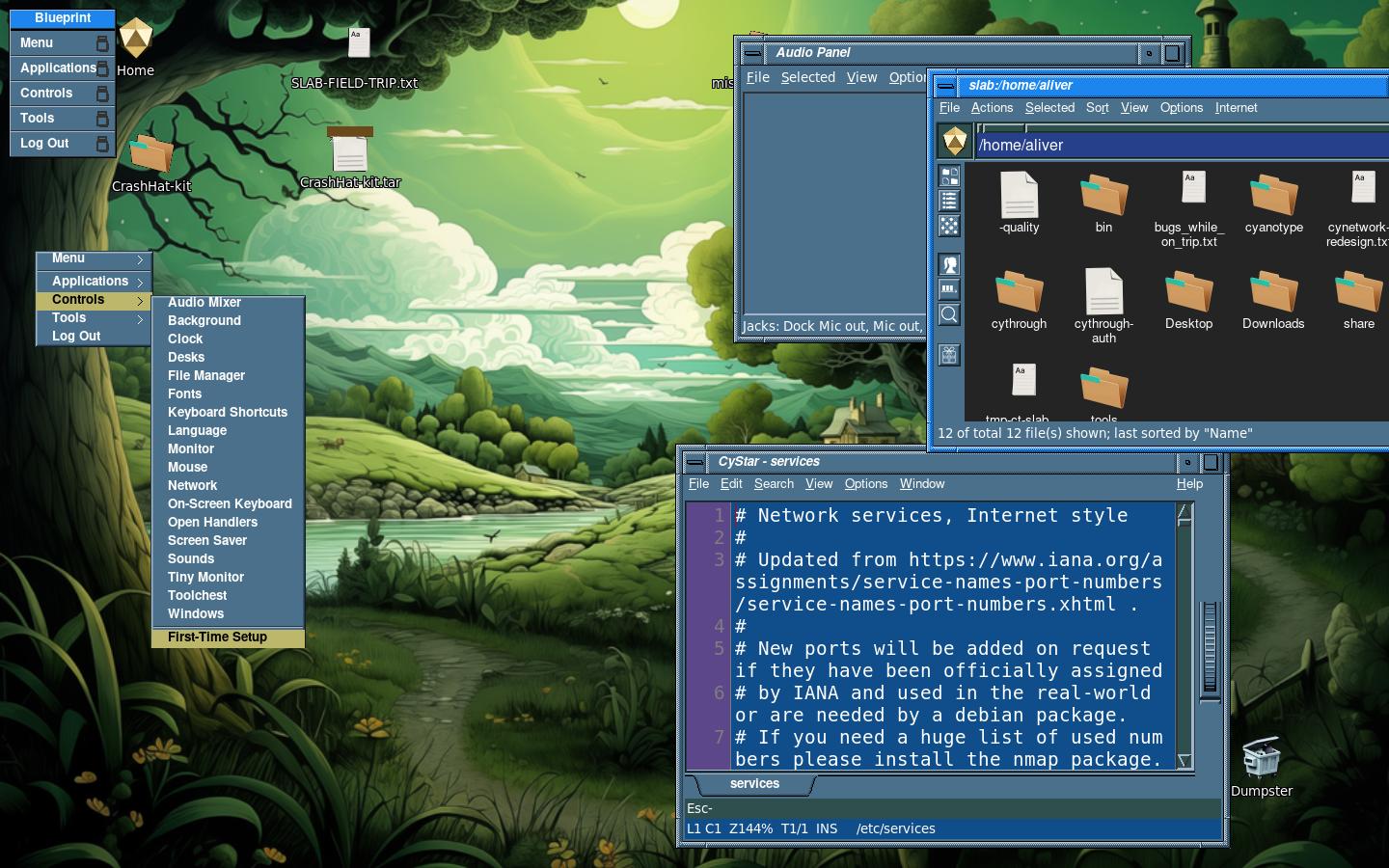
Tiling is optional. The desk starts out floating, with ordinary frames, and it stays that way until you ask for a layout. Hold Ctrl+Alt and tap t. Each tap steps to the next layout, and a preview stays up while the keys are still down. Let go and that layout becomes the desk. Escape cancels the preview. Ctrl+Alt+f puts the desk back to floating. The layouts are vertical, left, bottom, top, fair, fair horizontal, spiral, spiral dwindle, max, max fullscreen, magnifier, and deco. The first picture is the top bar, with three windows floating in the frames CyWM gave them. The second is the bottom bar in Fair tiling, where those same windows fill the work area and stop above the bar. The third is the vertical toolchest, with the same three windows still floating. The other layouts are on the Tiling page. That preview is called warp. Draft-up is the default, and the preview slides up into place. The other two choices are a ghost outline, and no preview at all.
Color is not a setting in the window-manager file. CySchemeD publishes named roles, such as the active title bar and the menu, and open frames follow those roles without starting a new session. The CyWall page shows this same desk under five schemes: Icy Blue Mountains, Magenta Landscape, Sunset over Ocean Waves, Space and Planetary Scene, and Orange Landscape Scene. The title bars and the toolchest take the scheme along with the wallpaper. CyStar can keep a canvas of its own, and that override is described on the CyStar page. The frames follow the desktop. A program that asked for colors of its own keeps those colors.
The root menu and the hotkeys are plain text, written in the Fluxbox menu grammar. The code that reads them is ours, and nothing on this desktop links the Fluxbox program. ~/.cyanotype/menu is the one menu file. CyWM posts it from the root window, on mouse button 3, on Alt+r, or on a bare Super tap. CyChest posts the same file, so the toolchest and the root menu cannot drift apart. The last picture on this page is that menu. Hotkeys live in ~/.cyanotype/keys.conf, which the Menu and Shortcuts panel writes. An older ~/.cyanotype/keys file, still in the Fluxbox keys grammar, still loads. When both files name the same chord, keys.conf wins. CyWM grabs the keys. The editor writes the file and asks CyWM to reload it.
The desktop exclusion zone is the strip along an edge that tiling and maximize leave alone, so the toolchest stays reachable. You set the edge and the depth in CyDock, or you let CyChest publish the strip for whichever face is on the screen. A fullscreen window, and the fullscreen tile layout, still cover that strip. You can drag a window onto it yourself. Tiling will not place one there. On the desk in these pictures, auto-adapt is off, which means the face does not keep measuring itself. The face that is up still reserves its strip, and CyWM honors that reservation (EWMH calls the reservation a strut). In the bottom-bar picture the windows are in Fair tiling, and they stop above the bar. The top bar reserves the top edge the same way. The vertical toolchest reserves the corner where it hangs.
CyWM also has a small bench of its own, taken on 25 July 2026 on the Linux builder. That run used a nested 1000x700 display, 200 repeats, and the numbers were recorded rather than used as a pass-or-fail gate. Mapping a window took about 1023 microseconds at the median, and about 1207 at the 95th percentile. Iconify took about 666, with a 95th of about 739. Deiconify took about 162, with a 95th of about 181. Configure took about 19, with a 95th of about 187. Those are CyWM's numbers on that fixture, and they are not the wmbench comparison on the Benchmarks page.
The top bar, with CyFiler, CyStar opened on /etc/services, and CyMix. Each window has the frame CyWM gave it, and none of them is maximized.
The bottom bar, in Fair tiling. The same three windows fill the work area and stop above the bar.
The vertical toolchest, style chest. The same three windows are floating, and the chest hangs at the upper left.
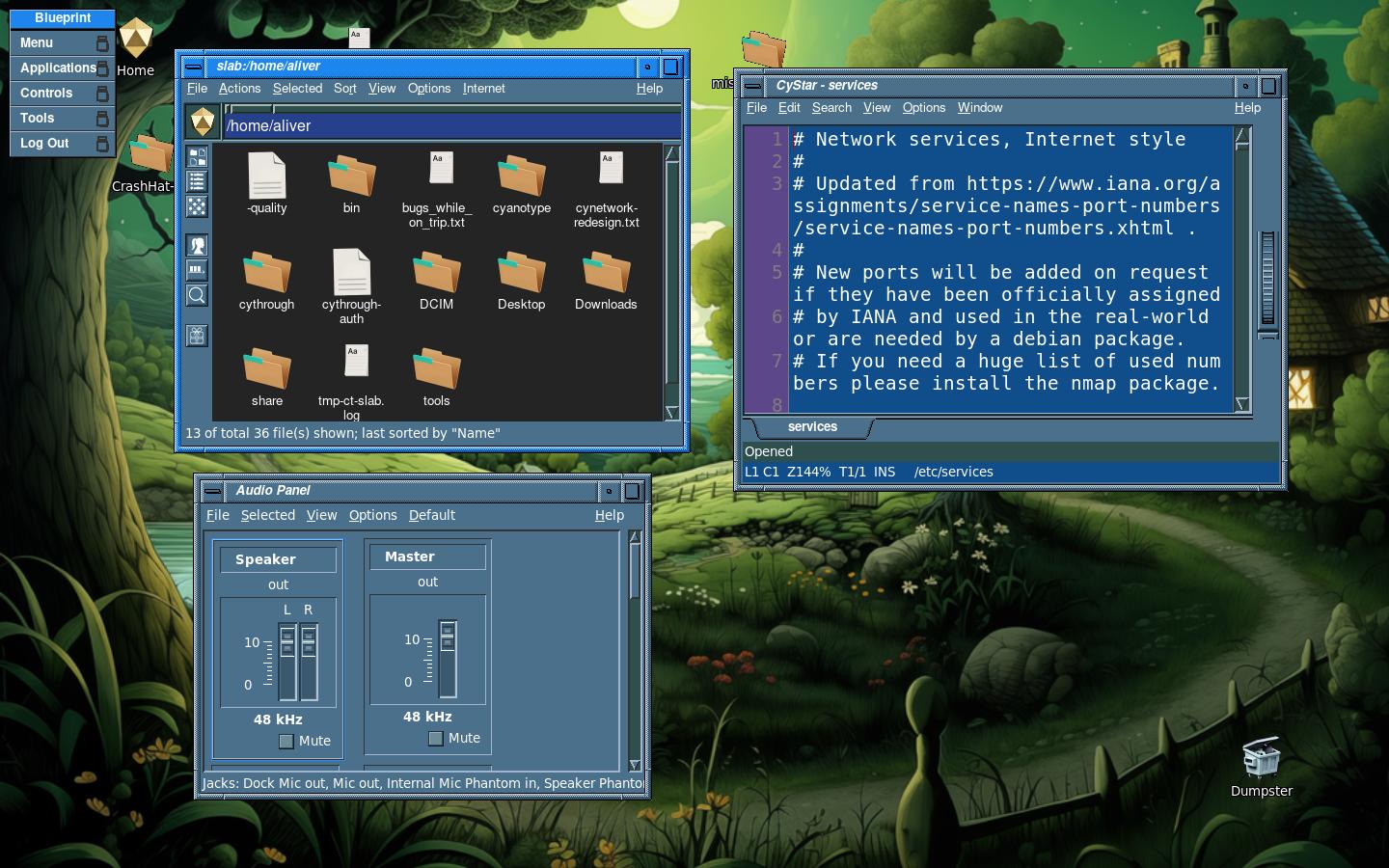
The root menu, posted from the root window. It is the one Fluxbox-grammar file, ~/.cyanotype/menu, and CyChest uses that same file.
See also: CyWM Preferences, Tiling Features, Benchmarks
 Cyanotype Project. Blueprint Desktop. BSD 2-clause.
Not affiliated with Silicon Graphics. SGI, IRIX, and Indigo Magic
belong to their owners. 1.0 is aimed at 31 October 2026.
Cyanotype Project. Blueprint Desktop. BSD 2-clause.
Not affiliated with Silicon Graphics. SGI, IRIX, and Indigo Magic
belong to their owners. 1.0 is aimed at 31 October 2026.